Wednesday, June 11, 2014

Auto startup and shutdown oracle database services on linux


Auto startup and shutdown oracle database services on linux


Applies to:
            Enterprise Linux – Version: 5
           
Description:
            I have oracle database 11gR2 on enterprise Linux 5.7. I want that all database services and listener should be stopped automatically when Linux going to shutdown. And after startup Linux all database services and listener start automatically.

Solution:
            To auto startup and shutdown all database services:


  •   Following parameter in /etc/oratab file should be Y:

orcl:/d01/app/oracle/product/11.2.0/dbhome_1:Y


  •  Set the following parameter in $ORACLE_HOME/bin/dbstart :

          ORACLE_HOME=/d01/app/oracle/product/11.2.0/dbhome_1;
          export ORACLE_HOME
          ORACLE_HOME_LISTNER=$ORACLE_HOME

  • Set the following parameter in $ORACLE_HOME/bin/dbshut :
         ORACLE_HOME=/d01/app/oracle/product/11.2.0/dbhome_1;
         export ORACLE_HOME
         ORACLE_HOME_LISTNER=$ORACLE_HOME

  • Create a file “dbora” in /etc/init.d/ using root user
         Contents of dbora file is:

#!/bin/sh
# description: Oracle database auto start-stop script.
#
ORA_HOME=/d01/app/oracle/product/11.2.0/dbhome_1
ORACLE_HOME_LISTNER=$ORA_HOME
ORA_OWNER=oracle
if [ ! -f $ORA_HOME/bin/dbstart ]
then
    echo "Oracle startup: cannot start"
    exit
fi
case "$1" in
'start')
# Start the Oracle Database Instance Using the Script Created by Rana Abdul Wahid:
# The following command assumes that the oracle login
# will not prompt the user for any values
su $ORA_OWNER -c $ORA_HOME/bin/dbstart $ORACLE_HOME &
touch /var/lock/subsys/dbora
;;
'stop')
# Stop the Oracle Database Instance Using the Script Created by Rana Abdul Wahid:
# The following command assumes that the oracle login
# will not prompt the user for any values
su $ORA_OWNER -c $ORA_HOME/bin/dbshut $ORACLE_HOME
rm -f /var/lock/subsys/dbora
;;
esac

  • Save the above file
  • chmod 750 /etc/init.d/dbora
  • chkconfig --add dbora

Now each time all database services shutdown normally when Linux shutdown. When Linux startup all database services automatically startup normally.


Your comments, especially which will help us improve the functionality, will be greatly appreciated. :)

Tuesday, May 6, 2014

How to recover corrupted fstab file in Linux

How to recover /etc/fstab in Linux


Applies to:
            Enterprise Linux – Version: 5

Description:
            I have an error in my /etc/fstab file and when I restart the computer it directly went to the “Repair filesystem” prompt asking the root password. When I went to correct the errors in the /etc/fstab file it is giving the following error:

Unable to open swap file for "fstab" , recovery impossible.

Changes cannot be saved.

Solution:
Boot up from any LiveCD, mount / partition and edit /etc/fstab file.
OR

I restart the computer it directly went to the “Repair filesystem” prompt asking the root password, enter root password.

Before editing fstab mount / on rw mode.

# mount -w -o remount / # Write allowed

After that you should be able to fix the fstab, and restart the computer.


Your comments, especially which will help us improve the functionality, will be greatly appreciatedJ

Thursday, February 13, 2014

How to Rebuild/Recreate Concurrent Manager

How to Rebuild/Recreate Concurrent Manager


Applies to:
            Oracle Applications – Version: 11.5.10.2 and above

Description:
            After cloning, concurrent manager unable to start successfully at 0 status.

Solution:
            Check the following solution on test environment before implement on production environment, rebuild concurrent manager using following steps:

·         Stop concurrent manager and wait to clear all processes of FNDLIBR or kill the processes

·         select * from fnd_concurrent_processes where process_status_code='A';

·         update fnd_concurrent_processes set process_status_code='K' where process_status_code='A';

·         select * from fnd_concurrent_queues where control_code='N';

·         update fnd_concurrent_queues set control_code=null where control_code='N';

·         update fnd_concurrent_queues set node_name=null,node_name2=null
where concurrent_queue_name not like 'FNDSM%' and concurrent_queue_name not like 'FNDIM%'
and concurrent_queue_name not like 'APACHE%' and concurrent_queue_name not like 'FORMS%'
and concurrent_queue_name not like 'REPORTS%' and concurrent_queue_name not like 'MET_CL%'
and concurrent_queue_name not like 'MET_SRV%' and concurrent_queue_name not like 'OAMGCS%';

·         select * from fnd_concurrent_queues where concurrent_queue_name = 'FNDCRM';

·         update fnd_concurrent_queues set control_code = 'A'
where concurrent_queue_name = 'FNDCRM';

·         Update fnd_concurrent_queues set target_node = null;

·         select distinct phase_code, status_code from fnd_concurrent_requests;

·         update fnd_concurrent_requests set phase_code = 'C' , status_code = 'C' where phase_code != 'P';

·         Stop all middle tier services including the concurrent managers
·         Stop the database
·         Start the database

·         Connect SQLPLUS as APPS user and run the following :
o   EXEC FND_CONC_CLONE.SETUP_CLEAN;
o   COMMIT;
o   EXIT;

Steps to Clean Nonexistent Nodes or IP Addresses from FND_NODES
( Note : In the case of a clone instance, it is strongly recommended to clean the non - existing nodes )

·         Run AutoConfig on all tiers, firstly on the DB tier and then the APPS tiers and webtiers to repopulate the required system tables

Connect to SQLPLUS as APPS user and run the following statement :

·         select CONCURRENT_QUEUE_NAME from FND_CONCURRENT_QUEUES where CONCURRENT_QUEUE_NAME like 'FNDSM%';

If the above SQL does not returning any value then please do the following:

·         Go to $FND_TOP/patch/115/sql
·         Connect SQLPLUS as APPS user and run the following script :
·         SQL> @afdcm037.sql;

How to Create The Service Manager 'FNDSM' on Oracle Applications:
This script will create libraries for FNDSM and create managers for preexisting nodes.
Check again that FNDSM entries now exist:

·         select CONCURRENT_QUEUE_NAME from FND_CONCURRENT_QUEUES where CONCURRENT_QUEUE_NAME like 'FNDSM%';

·         Go to cd $FND_TOP/bin
·         adrelink.sh force=y "fnd FNDLIBR"
·         adrelink.sh force=y "fnd FNDSM"
·         adrelink.sh force=y "fnd FNDFS"
·         adrelink.sh force=y "fnd FNDCRM"

·         Run the CMCLEAN.SQL script from the referenced note below (don't forget to commit)

Note 134007.1 - CMCLEAN.SQL - Non Destructive Script to Clean Concurrent Manager Tables
·        
       Start the middle tier services including your concurrent manager
·         Retest the issue

Your comments, especially which will help us improve the functionality, will be greatly appreciated :)

Friday, February 15, 2013

Export from Oracle Application Form did not save

Export from Oracle Application not save


Currently uses:
Oracle Enterprise Linux 5.5
Database 11gR2
Oracle EBS Application R12
IE 8 Windows 7

Description:
I am facing the problem while exporting data from Oracle Application form, export file did not save or I did not found where it save:


Solution:

Solution is very simple, just hold CTRL key while export now you have the option to save the export file where you want and in desired format:


Your comments, especially which will help us improve the functionality, will be greatly appreciated :)


Comments by Rana Muhammad Junaid:
Enable download option in internet explorer tools-internet options-security for both internet and intranet. And disable popup blocker if it is on. This should resolve this issue permanently and should be able to download without ctrl key. 

Wednesday, January 16, 2013

FRM-92050 failed to connect to Server /forms/servlet -1 Applet / Forms not opening on IE8


FRM-92050 failed to connect to Server /forms/servlet -1 Applet / Forms not opening on IE8


Currently uses:
Oracle Enterprise Linux 5.5
Database 11gR2
Oracle EBS Application R12
IE 8 Windows 7


Description:

I am facing the problem to open applet form on IE 8:


Solution:

After some research work I found the following solution:

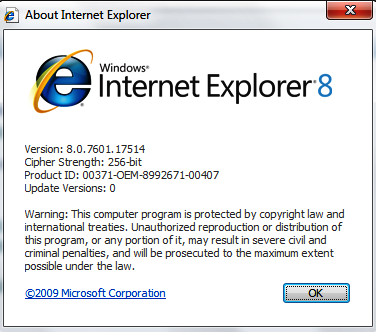
Confirm the IE version is greater or equal to 7:


Go to About Internet Explorer:


Go to Tools --> Internet Options


Go to Security Tab and then on Custom Level


Scroll down using scroll bar and check Enable XSS filter value


Disable the Enable XSS filter 


Apply the changes and retest the issue. 


Your comments, especially which will help us improve the functionality, will be greatly appreciated :)


How to Extend Swap space on LVM Disk Linux

How to Extend Swap space on LVM Disk Linux   Applies to:             Oracle Database 12.2             Oracle Linux 7 Description: ...