Sunday, November 12, 2017

FRM-92101: Forms Server Not Starting Up

Forms Server Not Starting Up / Forms Server Start Up Issue


Applies to:
            Oracle Enterprise Linux – Version: 5
            Oracle EBS R12

Description:
            After cloning EBS R12 successfully on a new server machine, when I am going to access any form on EBS clone it did not open the page and show the following error:

FRM-92101: Forms Server
Java Exception:
oracle.forms.net.ConnectionException: Forms session <1> failed during startup: no response from runtime process
at oracle.forms.net.ConnectionException.createConnectionException(Unknown Source)
at oracle.forms.net.HTTPNStream.getResponse(Unknown Source)

I have restarted all the services of application and database but the problem is same. I have also restarted the whole machine/server but still the same issue.

Cause and Solution:

I found the following error:
In $LOG_HOME/ora/10.1.3/j2ee/<oacore>/<oacore>_<default_group_1>/application.log
$LOG_HOME/ora/10.1.3/j2ee/<forms>/<forms>_<default_group_1>/application.log
$LOG_HOME/ora/10.1.3/j2ee/<oafm>/<oafm>_<default_group_1>/application.log

12/11/17 20:42:50 formsweb: Forms session <2> exception stack trace:
oracle.forms.engine.RunformException: Forms session <2> failed during startup: no response from runtime process
        at oracle.forms.servlet.RunformProcess.connect(Unknown Source)
        at oracle.forms.servlet.RunformProcess.dataToRunform(Unknown Source)
12/11/17 20:42:50 formsweb: Forms session <3> aborted: runtime process failed during startup with errors /d01/app/oracle/ebstest/apps/tech_st/10.1.2/bin/frmweb: error while loading shared libraries: libXm.so.2: cannot open shared object file: No such file or directory
12/11/17 20:42:50 formsweb: Forms session <3> exception stack trace:
oracle.forms.engine.RunformException: Forms session <3> failed during startup: no response from runtime process.

The above issue caused due to the incorrect version or missing of openmotif21 package.

Please check the oracle document 402310.1 Oracle Applications Installation and Upgrade Notes
in order to identify the missing RPM.
After installing the required RPM openmotif21-2.1.30-11.EL5 above problem has been resolved.


Your comments, especially which will help us improve the functionality, will be greatly appreciatedJ

Thursday, March 30, 2017

Oracle EBS Cloning with File System Cold Backup


Applies to:
Oracle EBS R12.1.3
Database 11.1.0.7.0
Operating System Oracle Enterprise Linux Server 5.8

Description:
Production hostname is EBSPROD
Test hostname is EBSTEST

Solution:
I am going to clone my Production server using file system cold backup.

Execute adpreclone.pl on DB Tier of EBSPROD:
$ cd /d01/oracle/PROD/db/tech_st/11.1.0/appsutil/scripts/PROD_ebsprod
$ perl adpreclone.pl dbTier pwd=apps

After completion of above script, then go to APPS Tier of EBSPROD:
$ cd /d01/oracle/PROD/inst/apps/PROD_ebsprod/admin/scripts
$ perl adpreclone.pl appsTier pwd=apps

After complete the above script, shutdown all services of APPS and DB and make tar files:

$ tar -czf PROD_DB_15Mar17_0030.tar.gz /d01/oracle/PROD/db
$ tar -czf PROD_APPS_15Mar17_0030.tar.gz /d01/oracle/PROD/apps
$ tar -czf PROD_INST_15Mar17_0030.tar.gz /d01/oracle/PROD/inst
$ tar -czf PROD_ARC_15Mar17_0030.tar.gz /archivelogs

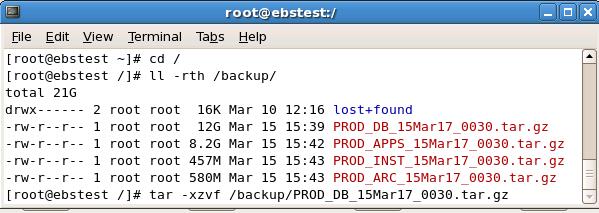
After installation of OS and all necessary RPM’s and configuration, copy the above files on EBSTEST.

Now untar the above files one by one:

$ tar –xzvf /backup/PROD_DB_15Mar17_0030.tar.gz
$ tar –xzvf /backup/PROD_APPS_15Mar17_0030.tar.gz
$ tar –xzvf /backup/PROD_INST_15Mar17_0030.tar.gz
$ tar –xzvf /backup/PROD_ARC_15Mar17_0030.tar.gz


Now start the cloning process on DB Tier first:


Database Tier has been successfully cloned. All services of Database Tier are up and running.

Now we are going to start the cloning process at APPS Tier:


 We have cloned successfully.


Your comments, especially which will help us improve the functionality, will be greatly appreciated.

Tuesday, March 1, 2016

FNDCPASS change SYSADMIN APPS passwords

FNDCPASS change SYSADMIN APPS passwords

Applies to:
            Oracle Enterprise Linux – Version: 5
            Oracle EBS R12

Description:
            How to change SYSADMIN and APPS passwords

Solution:
            You can change SYSADMIN and APPS passwords as follow:

Change the SYSADMIN password:
Login to application manager user and execute the following command
[appltest@ebstest] FNDCPASS apps/apps 0 Y system/managerr USER SYSADMIN <new-password>
Log filename : L1234567.log
Report filename : O1234567.out


Change the APPS password:
changing the APPLSYS password change the APPS password:
Login to application manager user and execute the following command
[appltest@ebstest] FNDCPASS apps/apps 0 Y system/manager SYSTEM APPLSYS <new-password>
Log filename : L1234567.log
Report filename : O1234567.out


Run the autoconfig on all the nodes, autoconfig is configuring the Applications environment.


Your comments, especially which will help us improve the functionality, will be greatly appreciatedJ

ORA-00845: MEMORY_TARGET not supported on this system

MEMORY_TARGET not supported on this system

Applies to:
            Oracle Enterprise Linux – Version: 5
            Oracle Database 11gR2

Description:
            I am going to create a new TEST instance from Production database. Hardware resources on TEST server less than from Production server. After restore the backup when I am going to start the database I got the following error message:

SQL> connect / as sysdba
Connected to an idle instance.
SQL> startup;
ORA-00845: MEMORY_TARGET not supported on this system

Solution:
After some research work I have found the following solution:
·         Check out /dev/shm is properly mounted by using following commands:
#df -h or #df -k command
·         Size of /dev/shm should be greater than MEMORY_TARGET or MEMMORY_MAX_TARGET parameter value
·         We see that /dev/shm have assigned 2G memory, and MEMORY_TARGET more than 2G then above ORA-845 will arise.
·         If you have MEMORY_TARGET or MEMORY_MAX_TARGET set to 4G then you should mount shared memory to greater than 4G.
·         Now login to root user and execute the following commands to fix the error:
# umount tmpfs
# mount -t tmpfs shmfs -o size=5G /dev/shm
·         In order to make the settings persistence you should add an entry in /etc/fstab similar to the following:
shmfs /dev/shm tmpfs size=5G 0


Your comments, especially which will help us improve the functionality, will be greatly appreciatedJ


Tuesday, June 16, 2015

Login Page Blank EBS R12

Blank EBS R12 Login page

Applies to:
            Oracle Enterprise Linux – Version: 5
            Oracle EBS R12

Description:
            After cloning EBS R12 successfully, when I am going to login EBS clone it did not show anything on the page. Login page is totally blank. I have restarted all the services of application and database but the problem is same. I have also restarted the whole machine/server but still the same issue.

Solution:
Following the steps to resolve the above issue:
1-      Stop all application services          
$INST_TOP/admin/scripts/adstpall.sh

2-      Remove any lock files from following folders:
$INST_TOP/ora/10.1.3/j2ee/oacore/persistence/oacore_default_group_1
$INST_TOP/ora/10.1.3/j2ee/oafm/persistence/oafm_default_group_1
$INST_TOP/ora/10.1.3/j2ee/forms/persistence/forms_default_group_1

3-      Compile the JSP files with the following command
cd $FND_TOP/patch/115/bin
perl ojspCompile.pl --compile --flush -p 2

4-      Run Autoconfig first on the DB Tier, and then on APPS Tier

5-      Start appl services
$INST_TOP/admin/scripts/adstrtall.sh


Your comments, especially which will help us improve the functionality, will be greatly appreciatedJ


Thursday, December 11, 2014

sys / as sysdba should require a password


sys / as sysdba should require a password

Applies to:
            Enterprise Linux – Version: 5

Description:
            Sqlplus / as sysdba connections go through OS authentication rather than database authentication. Any user with OS access can log into database irrespective of valid account available in database. Sys / as sysdba could not login without a password.
How can we control OS authentication to stop any OS user to login as SYSDBA?

Solution:
Set the following parameter in init.ora file:
REMOTE_OS_AUTHENT = FALSE

open sqlnet.ora file and set the following parameter:
SQLNET.AUTHENTICATION_SERVICES=(NONE)

save and exit file.

now you cannot login "sys / as sysdba" without password.


Your comments, especially which will help us improve the functionality, will be greatly appreciated :)

Tuesday, September 16, 2014

Auto Mount of Windows Shared Folder on Linux


Auto Mount of Windows Shared Folder on Linux

Applies to:
            Enterprise Linux – Version: any
           
Description:
            I have oracle database 11gR2 on oracle enterprise Linux 5.7. I want to mount a windows shared folder on linux.

Solution:
            To mount a windows shared folder on linux:
·         Login on linux by root user
·         Check the following rpm’s:
o   Fuse-2.7.4-8.el5
o   Fuse-ntfs-3g-2010.5.22-1.el5.rf
·         If not, install the above rpm’s on linux
·         Now create a new folder</data> on linux to mount windows folder
·         Grant read/write permission on windows shared folder<Data_Backups> to a windows/domain user<datacell>, windows machine IP <192.168.1.1>
·         Execute the following command on linux by root user to mount it:
mount  -t cifs  -o username=datacell,password=data123,ip=192.168.1.1 ‘\\192.168.1.1\Data_Backups’ /data
·         Windows shared folder mounted on /data on linux
·         Check mount points execute command:
df  -h
·         /data has been mounted

Now after restart linux machine mount point /data has been disappeared. To auto mount the /data mount point at startup on linux, you should enter the mount point entry in /etc/fstab as follow:

vi /etc/fstab

Go to bottom of  the file and enter the following line:

\\192.168.1.1\Data_Backups   /data     cifs      username=datacell,password=data123 0  0

Save and exit from file.

Now after restart the linux machine /data mount point automatically mount.


Your comments, especially which will help us improve the functionality, will be greatly appreciated :)

How to Extend Swap space on LVM Disk Linux

How to Extend Swap space on LVM Disk Linux   Applies to:             Oracle Database 12.2             Oracle Linux 7 Description: ...