Tuesday, September 25, 2018

Unable to Open Oracle EBS forms in Internet Explorer 11 on Windows 10


Oracle EBS Open in Internet Explorer 11 on Windows 10
           
Applies to:
            Oracle Enterprise Linux – Version: 7
            Oracle EBS R12.1.3
           
Description:
            After upgrade Windows 7 to Windows 10 on client end we face the problem,                Oracle EBS login successfully but unable to open the forms.  

Solution:
            Following the steps to configure Internet Explorer 11 for Oracle EBS:
·       Open the Internet Explorer 11 and Navigate to Tools à Compatibility View Settings.  
Then add Domain name in the URL (ex: oraebs.com in vision.oraebs.com) using Add this website option.

·       Now navigate to Tools à Internet Options à Security. Select Internet and click on Custom Level button. Scroll down till end of the options and Disable the option Enable XSS filter.

·       Navigate to Tools à Internet Options à Security. Select Local Intranet and click on Sites button and then click on Advanced button. Enter the EBS URL address and click on Add button.

·       Install Java (JRE) jre-6u30-windows-x64 on client end, as it is compatible for my EBS environment and Java (JDK) version at Server end.

This solution worked for me and I am able to open EBS R12 forms in Internet Explorer version 11 on Windows 10.


Your comments, especially which will help us improve the functionality, will be greatly appreciatedJ


Wednesday, September 19, 2018

Configure YUM Repository from installation DVD


Configure YUM Repository from installation DVD
           
Applies to:
            Oracle Enterprise Linux – Version: 7
           
Description:
            Configuring YUM on OEL 7 from installation DVD

Solution:
Following the steps to configure YUM from installation DVD:
After installation of Oracle Linux 7 configure YUM repository from installation DVD to install other RPMs.
Insert installation DVD of OEL 7 into CD/DVD ROM.

# umount /cdrom
# mount /dev/sr0 /mnt
# cd /etc/yum.repos.d/

Create a new file:
# vi rhel7dvd.repo

Add the following details:
[cdrom]
name=CDROM Repo
baseurl=file:///mnt
enabled=1
gpgcheck=1
gpgkey=file:///etc/pki/rpm-gpg/RPM-GPG-KEY-oracle

Save the above file

Clear the related caches by yum clean all and subscription-manager:
# yum clean all
# subscription-manager clean

Check whether you can get the packages list from the DVD repo:
# yum list – noplugin
 
If no problem, you will update:
# yum update – noplugin
 
# yum-config-manager --disable ol7_UEKR3
# yum-config-manager --disable ol7_latest
 
# yum update – noplugin


Your comments, especially which will help us improve the functionality, will be greatly appreciatedJ
Tuesday, September 18, 2018

Monitor all DDL Statements at Database Level


Monitor All DDL Statements at Database Level

Applies to:
            Oracle Enterprise Linux – Version: 7
            Oracle Database 11gR2

Description:
            I want to track all DDL statements at Database level.

Solution:
Following the steps to track all DDL statements at Database level:

1-      First to create a Table that store DDL statements

CREATE TABLE DDL_MONITOR_DB
(
  DATE_TIME  DATE,
  DDL_EVENT  VARCHAR2(500),
  OS_USER    VARCHAR2(50),
  MACHINE    VARCHAR2(100)
)

2-      Create a Trigger at Database level to catches all DDL statements

CREATE OR REPLACE TRIGGER DDL_MONITOR
AFTER CREATE OR DROP OR TRUNCATE OR ALTER ON DATABASE
DECLARE

   V_OSUSER   V$SESSION.OSUSER%TYPE;
   V_MACHINE  V$SESSION.MACHINE%TYPE;
   V_IP   VARCHAR2(20);
   V_DATABASE V$PARAMETER.VALUE%TYPE;

BEGIN
      SELECT VALUE INTO V_DATABASE FROM v$parameter WHERE NAME = 'db_name';
                 V_OSUSER  :=SYS_CONTEXT('USERENV','OS_USER');
                 V_MACHINE :=SYS_CONTEXT('USERENV','TERMINAL');
                 V_IP      := SYS_CONTEXT('USERENV','IP_ADDRESS');

INSERT INTO DDL_MONITOR_DB (date_time, ddl_event, os_user, machine)
VALUES (SYSDATE, 'Username: (' || ora_login_user || ')   ' || 'Action: (' || ora_sysevent || ')   ' ||
'Object: (' || ora_dict_obj_owner||'.'||ora_dict_obj_name || ')   ' ||
'Type: (' || ora_dict_obj_type || ')', V_OSUSER, V_IP || ' (' || V_MACHINE || ')');


EXCEPTION WHEN OTHERS THEN NULL;
END;
/


Your comments, especially which will help us improve the functionality, will be greatly appreciatedJ

Friday, August 31, 2018

ORA-10564 Tablespace UNDOTBS1 ORA-01110 ORA-10560


ORA-10564 Tablespace UNDOTBS1 ORA-01110 ORA-10560

Applies to:
            Oracle Enterprise Linux – Version: 7
            Oracle EBS R12

Description:
            After abnormal shutdown of server we face the problem “ORA-10564 Tablespace UNDOTBS1 ORA-01110 data file 7 UNDOTBS01.DBF ORA-10560 block type KTU UNDO BLOCK”. I have restarted all the services of database but the problem is same. I have also restarted the whole machine/server but still the same issue.

Solution:
            After some research I found that recreate the undo tablespace to resolve the issue.
Following the steps to resolve the above issue:

1-      Connect / as sysdba

2-      Create undo tablespace UNDOTBS2 datafile ‘/u01/oracle/oradata/undotbs02.dbf’ size=1G;

3-      Alter system set undo_tablespace = UNDOTBS2;

4-      Shutdown immediate

5-      startup

6-      Drop tablespace UNDOTBS1 including contents and datafiles;

Database is working fine now.


Your comments, especially which will help us improve the functionality, will be greatly appreciatedJ


Thursday, August 30, 2018

Web Application Services adoacorectl.sh failed


EBS R12 Web Application Services adoacorectl.sh failed

Applies to:
            Oracle Enterprise Linux – Version: 7
            Oracle EBS R12

Description:
            Oracle EBS R12 Application services cannot start successfully adoacorectl.sh going to failed. I have restarted all the services of application and database but the problem is same. I have also restarted the whole machine/server but still the same issue. I found in log file that all OC4J services (oacore, oafm, form) going to fail with timeout error.

Solution:
            After some research I found that need to clean out the lock files.
Following the steps to resolve the above issue:
1-      Stop all application services          
$INST_TOP/admin/scripts/adstpall.sh

2-      Remove any .lock files from following folders:
$INST_TOP/ora/10.1.3/j2ee/oacore/persistence/oacore_default_group_1
$INST_TOP/ora/10.1.3/j2ee/oafm/persistence/oafm_default_group_1
$INST_TOP/ora/10.1.3/j2ee/forms/persistence/forms_default_group_1

3-      Also remove the following files if exists:
$COMMON_TOP/cacheLock
$COMMON_TOP/_TldCache

4-      Now Start application services
$INST_TOP/admin/scripts/adstrtall.sh

                   All services going to start successfully.


Your comments, especially which will help us improve the functionality, will be greatly appreciatedJ


Sunday, November 12, 2017

FRM-92101: Forms Server Not Starting Up

Forms Server Not Starting Up / Forms Server Start Up Issue


Applies to:
            Oracle Enterprise Linux – Version: 5
            Oracle EBS R12

Description:
            After cloning EBS R12 successfully on a new server machine, when I am going to access any form on EBS clone it did not open the page and show the following error:

FRM-92101: Forms Server
Java Exception:
oracle.forms.net.ConnectionException: Forms session <1> failed during startup: no response from runtime process
at oracle.forms.net.ConnectionException.createConnectionException(Unknown Source)
at oracle.forms.net.HTTPNStream.getResponse(Unknown Source)

I have restarted all the services of application and database but the problem is same. I have also restarted the whole machine/server but still the same issue.

Cause and Solution:

I found the following error:
In $LOG_HOME/ora/10.1.3/j2ee/<oacore>/<oacore>_<default_group_1>/application.log
$LOG_HOME/ora/10.1.3/j2ee/<forms>/<forms>_<default_group_1>/application.log
$LOG_HOME/ora/10.1.3/j2ee/<oafm>/<oafm>_<default_group_1>/application.log

12/11/17 20:42:50 formsweb: Forms session <2> exception stack trace:
oracle.forms.engine.RunformException: Forms session <2> failed during startup: no response from runtime process
        at oracle.forms.servlet.RunformProcess.connect(Unknown Source)
        at oracle.forms.servlet.RunformProcess.dataToRunform(Unknown Source)
12/11/17 20:42:50 formsweb: Forms session <3> aborted: runtime process failed during startup with errors /d01/app/oracle/ebstest/apps/tech_st/10.1.2/bin/frmweb: error while loading shared libraries: libXm.so.2: cannot open shared object file: No such file or directory
12/11/17 20:42:50 formsweb: Forms session <3> exception stack trace:
oracle.forms.engine.RunformException: Forms session <3> failed during startup: no response from runtime process.

The above issue caused due to the incorrect version or missing of openmotif21 package.

Please check the oracle document 402310.1 Oracle Applications Installation and Upgrade Notes
in order to identify the missing RPM.
After installing the required RPM openmotif21-2.1.30-11.EL5 above problem has been resolved.


Your comments, especially which will help us improve the functionality, will be greatly appreciatedJ

Thursday, March 30, 2017

Oracle EBS Cloning with File System Cold Backup


Applies to:
Oracle EBS R12.1.3
Database 11.1.0.7.0
Operating System Oracle Enterprise Linux Server 5.8

Description:
Production hostname is EBSPROD
Test hostname is EBSTEST

Solution:
I am going to clone my Production server using file system cold backup.

Execute adpreclone.pl on DB Tier of EBSPROD:
$ cd /d01/oracle/PROD/db/tech_st/11.1.0/appsutil/scripts/PROD_ebsprod
$ perl adpreclone.pl dbTier pwd=apps

After completion of above script, then go to APPS Tier of EBSPROD:
$ cd /d01/oracle/PROD/inst/apps/PROD_ebsprod/admin/scripts
$ perl adpreclone.pl appsTier pwd=apps

After complete the above script, shutdown all services of APPS and DB and make tar files:

$ tar -czf PROD_DB_15Mar17_0030.tar.gz /d01/oracle/PROD/db
$ tar -czf PROD_APPS_15Mar17_0030.tar.gz /d01/oracle/PROD/apps
$ tar -czf PROD_INST_15Mar17_0030.tar.gz /d01/oracle/PROD/inst
$ tar -czf PROD_ARC_15Mar17_0030.tar.gz /archivelogs

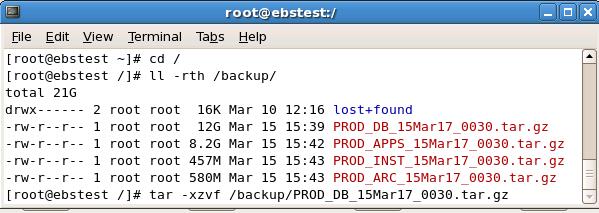
After installation of OS and all necessary RPM’s and configuration, copy the above files on EBSTEST.

Now untar the above files one by one:

$ tar –xzvf /backup/PROD_DB_15Mar17_0030.tar.gz
$ tar –xzvf /backup/PROD_APPS_15Mar17_0030.tar.gz
$ tar –xzvf /backup/PROD_INST_15Mar17_0030.tar.gz
$ tar –xzvf /backup/PROD_ARC_15Mar17_0030.tar.gz


Now start the cloning process on DB Tier first:


Database Tier has been successfully cloned. All services of Database Tier are up and running.

Now we are going to start the cloning process at APPS Tier:


 We have cloned successfully.


Your comments, especially which will help us improve the functionality, will be greatly appreciated.

How to Extend Swap space on LVM Disk Linux

How to Extend Swap space on LVM Disk Linux   Applies to:             Oracle Database 12.2             Oracle Linux 7 Description: ...